NestJS Guards, Interceptors, and Pipes: Request Processing
Master NestJS request processing pipeline. Learn guards for authentication, interceptors for transformations, and pipes for validation.
NestJS provides powerful mechanisms for processing requests through guards, interceptors, and pipes. These building blocks enable implementing cross-cutting concerns like authentication, logging, validation, and response transformation in a clean, reusable way. Understanding the request processing pipeline and when to use each mechanism is crucial for building maintainable NestJS applications. This guide covers each concept in depth, from basic implementation to advanced patterns, helping you leverage these features effectively.
📚 Table of Contents
Request Processing Pipeline Overview
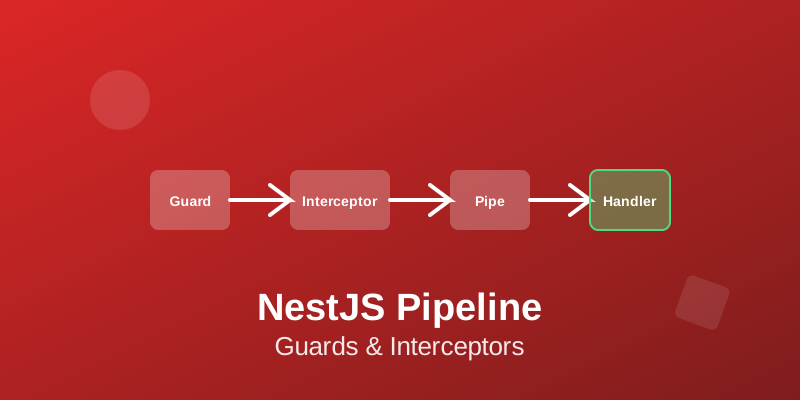
NestJS request processing follows a specific order: middleware → guards → interceptors (before) → pipes → route handler → interceptors (after) → exception filters. Understanding this flow is essential for using these mechanisms effectively. Middleware runs first, suitable for logging, parsing, or authentication.
Guards determine if a request proceeds, perfect for authentication and authorization. Pipes transform and validate input data. Interceptors can wrap request handling, adding logic before and after.
Exception filters catch and handle errors. Each mechanism serves a specific purpose, and choosing the right one for each task makes code cleaner and more maintainable. Avoid implementing everything in middleware - use appropriate mechanisms for different concerns.
Implementing Guards
Guards implement the CanActivate interface with a canActivate() method returning boolean or Promise<boolean>. Guards determine if a request should be handled. Use guards for authentication (checking if user is logged in) and authorization (checking if user has required permissions).
Create guards with @Injectable() decorator. Access execution context to inspect requests, retrieve metadata, and make decisions. Use Reflector to read custom metadata set with decorators.
Guards can be controller-scoped, method-scoped, or global. Throw UnauthorizedException or ForbiddenException to block requests. Guards are perfect for implementing role-based access control (RBAC).
Combine guards with custom decorators for clean syntax like @Roles("admin"). Guards execute before pipes, so they work with raw request data.
Working with Interceptors
Interceptors implement the NestInterceptor interface with an intercept() method. Interceptors can execute logic before and after route handler execution, transform results, catch exceptions, or extend basic function behavior. Use interceptors for logging, performance monitoring, response transformation, caching, or timeout handling.
Access execution context and CallHandler to control handler execution. Call handle() on CallHandler to invoke the route handler. The handle() method returns an Observable - use RxJS operators to transform responses.
Interceptors are powerful for cross-cutting concerns. Common patterns include wrapping responses in standard formats, adding timestamps, removing null fields, or implementing caching logic. Bind interceptors at controller, method, or global level based on scope needs.
Validation with Pipes
Pipes transform input data or validate it, throwing exceptions for invalid input. NestJS provides built-in pipes like ValidationPipe, ParseIntPipe, ParseBoolPipe, ParseArrayPipe, ParseUUIDPipe, and ParseEnumPipe. ValidationPipe works with class-validator decorators to validate DTOs automatically.
Create custom pipes implementing PipeTransform interface with a transform() method. Pipes receive two arguments: the value to transform and metadata about the argument. Use pipes for type conversion, validation, data sanitization, or default values.
Bind pipes at parameter level (@Body(new ValidationPipe())), route handler level, controller level, or globally. ValidationPipe with class-validator is essential for input validation - it validates request bodies, query parameters, and route parameters automatically. Enable transform: true to convert validated data to DTO class instances.
Combining Guards, Interceptors, and Pipes
These mechanisms work together in the request pipeline. A common pattern: guards check authentication, pipes validate input, controller handles business logic, interceptors transform responses. For example, an endpoint might use @Roles() decorator (read by RolesGuard), ValidationPipe for DTO validation, and ResponseInterceptor for consistent response formatting.
Design each mechanism to have a single responsibility. Guards should only make authorization decisions, not transform data. Pipes should only validate/transform input, not implement business logic.
Interceptors should handle cross-cutting concerns, not business logic. Keep guards, interceptors, and pipes thin and focused. Create reusable instances that can be applied across different endpoints.
Document which mechanisms are applied globally vs per-route.
Custom Decorators and Metadata
Create custom decorators to make code more readable and maintainable. Use SetMetadata to attach metadata to routes, then use Reflector in guards or interceptors to read it. Common patterns include @Roles() decorator for RBAC, @Public() to skip authentication, or @Timeout() for custom timeouts.
Combine parameter decorators with pipes for clean syntax. Create decorator compositions to reduce boilerplate - @Auth() decorator might combine multiple decorators like @UseGuards() and @ApiBearerAuth(). Custom decorators make routes self-documenting and reduce repetitive code.
Parameter decorators can extract specific data from requests. For example, @User() decorator might extract user from request object decorated by authentication middleware.
Error Handling and Exception Filters
Exception filters catch and handle errors in the request pipeline. NestJS provides built-in exception filters, but you can create custom ones implementing ExceptionFilter interface. Exception filters receive the exception and execution context.
Transform exceptions into appropriate HTTP responses. Use filters for consistent error formatting, logging errors, or converting non-HTTP exceptions. Apply filters globally, at controller level, or at route level.
Built-in HttpException and its subclasses (BadRequestException, NotFoundException, etc.) work with default exception filter. For custom error handling, extend HttpException or implement custom exception classes. Always return appropriate HTTP status codes.
Log errors with sufficient context for debugging. Consider implementing different error responses for development vs production environments.
💡 Key Takeaways
Guards, interceptors, and pipes are fundamental to NestJS architecture, enabling clean separation of concerns and reusable logic. Guards handle authentication and authorization, interceptors manage cross-cutting concerns and response transformation, and pipes validate and transform input data.
Conclusion
Guards, interceptors, and pipes are fundamental to NestJS architecture, enabling clean separation of concerns and reusable logic. Guards handle authentication and authorization, interceptors manage cross-cutting concerns and response transformation, and pipes validate and transform input data. Understanding when to use each mechanism and their order in the request pipeline is essential for building well-structured NestJS applications. These tools, combined with custom decorators and proper error handling, enable writing clean, maintainable code with minimal boilerplate. Start by using built-in implementations, then create custom ones as your application's specific needs emerge. Keep each mechanism focused on its intended purpose, and your code will remain clean and testable.